Wednesday, May 28, 2008

Fixed Flash detection for Opera / Wii

Some folks over at the Jangaron Tron-Sector thread reported that version 0.5 does not work in certain browsers and under certain circumstances.
The good news: I fixed a bug in my Flash detection code so that it now works in Opera without the right (and still without any) Flash plug-in. That fix (version 0.51) should make it work on the Wii, too ("work" in this case means "no sound, but at least you can play the game").
Concerning other browsers, some people seem to have tried IE6 and very old Safari versions which I cannot test, and both do not work. Let me quote from my own post over at Tron-Sector:
Jangaron is based on CSS border slants, which are not fully functional in IE6. One crucial feature, namely transparent borders, is missing in older IE versions, and Jangaron heavily relies on that feature.
Besides Firefox and IE7, there are many other alternative browsers that are supported by Jangaron: all other Gecko-based browsers should work (Iceweasel, Netscape, Camino, ...), Safari 3.1 (I think 3.0 also, but I am not sure) and other WebKit-based browsers, Opera 9.25 and thus the Wii browser. Unfortunately, there are still problems with browsers based on KHTML (the WebKit predecessor), like Konqueror 3.x. Jangaron's stable version seems to run on Konqueror 4, though, because some serious bugs in KHTML's JavaScript engine were fixed (or was it even replaced completely?).
Jangaron's claim "The Tron Lightcycle Game in any modern browser" is to be emphasized on modern, and is also rather a vision than a completely proven fact. I need help for testing and debugging Jangaron in this multitude of browsers, so all you JavaScript / DHTML gurus out there, feel welcome to support!
Thank you for starting to report problems; now, let's analyse and fix them if possible!

Saturday, May 24, 2008

Jangaron 0.5 is out!

Finally, its done! We arrived at a level where Jangaron version 0.5 seems stable enough to announce it to the public and offer you an updated version packed with new features!
"We", in this case, are David "Avi" Scott and Frank "Joo" Wienberg and all the others who gave valuable feedback.
Note that version 0.43 is still available at the well-know location www.jangaron.net/jangaron.html. The index page www.jangaron.net now lets you choose between the stable (0.43) and the experimental (0.5) version.
Night of the Feature Creep
The most important feature for the new version turned out to be something that wasn't even mentioned in the voting (sorry, guys, no grassroots democracy yet): Sound and music! And David is the one who contributed his own compositions to Jangaron. Thank you again, David, for your excellent "labor of love"!
To give you a quick overview of what to expect from Jangaron 0.5:
  • Look Left/Right/Aback - One of the most-voted features is now available, and even in the extended version that you can also take a look behind, watching out for lightcycles chasing you! This gives you more overview and allows new strategies. The keyboard setup has been extended by three columns for the corresponding keys.
  • Sound and Music - This one is the real feature creep. I revamped Gustavo Ribeiro Amigo's Javascript Sound Kit for Jangaroo (no, this is not a typo: as faithful readers might remember, Jangaroo is the language Jangaron is developed in). Sound is only available when you have a Flash plug-in which must be version 8 or higher, but the game remains true to not requiring any plug-in, you just have no sound then. This technical feature allowed to enrich the game with sound and David's great music. Pump up the volume and enjoy!
  • Team Play and Presets - I promised Brian to include teams in the next Jangaron release, and as I tend to keep my promises, you all had to wait a little bit longer ;-). But it turned out great (at least I think so!) and was worth the effort. Team play allows a variety of modes and so that you do not get lost in configuration space, we included presets for classical setups: you can replay the famous original movie scene (User vs. MCP), fight one on one (on one on one...), setup pairs, or face your destiny as a Lone Hero against one big MCP squadron. Starting from one of these presets, you can create your own personal setup. Please let me know your favorite team play mode!
  • Save Settings - a feature you did not know you wanted. Now that there are various ways to set up the game, it would be a pity if you always had to start from scratch when reloading or revisiting. All settings are saved to a browser cookie. Note that the in-game statistics (wins, deaths) are not stored.
  • More Accurate Lightcycle Control - I noticed that especially in critical situations where there is a lot work for the rendering engine, the lightcycle control became inaccurate. I improved this by recording the key event time and computing a more precise turn position. This change improves gameplay a lot and increases your chances to beat the stupid, but fast-reacting program players (they somehow remind me of Matrix Agents).
I hope you enjoy the new version as much as I do myself. Jangaron started more or less as a proof-of-concept for the Jangaroo language tools and was nice, but probably not long-lasting fun to play in the previous versions. Version 0.5 offers music, sound, and much more variety in gameplay, in particular for multiplayer sessions, so I hope you'll all become Jangaronies! Let me know of your preferences, ideas, feature requests, or if you are willing to contribute! Just leave a comment here or drop me a mail (joo[AT]jangaron[DOT]net).
More about the technical challenges, pitfalls we had to overcome, and solutions later...
See you on the Grid!

Tuesday, May 13, 2008

Playing Jangaron with a Gamepad

I've been quite busy working on the next game release, but to jolly you along, I have something from the "tips & tricks" section.
For two or more players, sharing the keyboard takes Jangaron's game goal that you have to elbow your way through a bit too literally. Also, using the keyboard for an arcade game is not everyone's cup of tea.
I remembered the tool that accompanied good old M$'s precision pro joystick, which could make any joystick button simulate any key press (even sequences!), and thought there must be a similar, free tool that works for any joystick or gamepad. I searched, and of course, there are many such tools.
I tried Xpadder, because at first glance, it looked the most convincing and is free (but don't you forget to donate, pal!), and I must say it really works neat with Jangaron!
You can choose two approaches: Either, you map the buttons and axis of your gamepad or joystick to any key and then adapt the settings in Jangaron, which I would not recommend until the next Jangaron version which saves settings. Or, you map the buttons / axis to the preconfigured keys of some Jangaron user player and optionally space (for pause) and return (for confirming the "game over" dialog) -- that's what I did. There is no noticeable performance impact, and if you chose the buttons wisely, you will be rewarded with a new gameplay feeling of Jangaron, especially for multiplayer sessions!

Saturday, April 19, 2008

User's Voices II: And the Winner is...

The "next features"-poll is closed, thank you for participating! As you can see, there is no clear winner: Both "look left / right" and "2D grid overview" received exactly the same number of votes (4), while the other two candidates, "save settings" and "configure acceleration", have been defeated. In my previous post about the poll, I voiced my doubts about the "2D grid overview" feature, so I am going to take the liberty to start with "look left / right". To be honest, in the meantime I already implemented one of the "loser" features, namely "save settings", since it turned out to be quite a quick-win.
While we're at it, I'd like to congratulate Brian (USA) for being the first and (so far) only visitor to actually leave a comment in the Jangaron blog! Why are you other 124 people (at least that's what Googalytics tells me...) so quiet? Brian, in return for your commitment and commendation, I am going to implement your feature request, too, and introduce configuration of teams and start positions in the next Jangaron version!
But please be patient, I have to steal some more time until it's ready to show. Maybe I'll offer a "beta" (wow, isn't that Web-2.0-ish?) before the next stable version, since I have some more surprises up my sleeve...

Friday, April 18, 2008

Multiplayer fixed

Zaphod tried to run in several equally decisive directions simultaneously. "Right!" he said. "Er ... we've got to get manual control of this ship."

"Can you fly her?" asked Ford pleasantly.

"No, can you?"

"No."

"Trillian, can you?"

"No."

"Fine," said Zaphod, relaxing. "We'll do it together."


Sorry, users, since some minor modifications to Jangaron for the "mini" version, multiplayer was broken! Both player views were rendered, but only one could be controlled, independent of key assignment.
The reason was a stupid bug: In the switch statement for key control, I wrote
case keyMap.slower: [...]; break;
otherwise: return true;
What I meant was:
case keyMap.slower: ...; break;
default: return true;
But unfortunately, the erroneous otherwise was interpreted as a label (a JavaScript language construct I never use!), so no error was raised, but return true was never executed! This led to the first player swallowing all key presses.
Of course I fixed the problem as soon as I noticed it. Since it was only a minor patch, I did not increase the version number.
You should know that Jangaron is a hobby project. There is no quality assurance, just some basic testing, and there are not yet any real "releases". This is why I need you! If anything does not work or looks awful or is unusable, or if you have any other feed-back, let me know!
So now, please go ahead and play Jangaron with two or more users! Believe me, it's much more fun than against programs.

Monday, April 14, 2008

Wii love(s) Jangaron

Tron-Sector member TRON.dll did it - he not only tried out Jangaron on the Wii, he also made a quick video about it and put it online! The video shows how he configures the keys to match the Wii remote control and proves that the actual game runs on Wii's Opera browser.

After having conquered the Wii, next target is of course the iPhone:
Looks quite real, but unfortunately isn't... yet! What you see is just a joke some clever dudes put online to exploit the iPhone hype, not a real iPhone emulator. But for fun, you can go to iphonetester.com, rotate the "emulated" iPhone, enter the Jangaron mini URL http://www.jangaron.net/jangaron-mini.html -- and pretend to play Jangaron on an iPhone!

Friday, April 11, 2008

The Art and Science of CSS Border Slants

When reading through the games category over at Ajaxian, I stumbled across a review of James Edward's article The Art and Science of JavaScript Games. One the one hand, I was quite thrilled by the fact that somebody else had had the idea to write a 3D JavaScript / DHTML game, on the other hand, I was quite disappointed by the realization (given its pretentious title).
James Edwards may belong to the "seven of the greatest minds in modern JavaScript" (as quoted on his own home page), but he misses some points about CSS border slants, which leads to an unnecessary complex solution.
Unfortunately, the source he cites, Tantek Çelik's "technique for creating shapes using the interactions between CSS borders", leads to a dead link. I could only find something similar, A Study of Regular Polygons. I still prefer the source already mentioned in a previous post, CSS border slants, which links to the original source of Eric Meyer's Slantastic Demo.

Triangle Man Hates Particle Man
Whatever source James Edwards used, he should have realized that the shapes he wants to draw for his 3D maze can be produced much simpler. And thus he misses the most important point for a tutorial: keeping things simple!
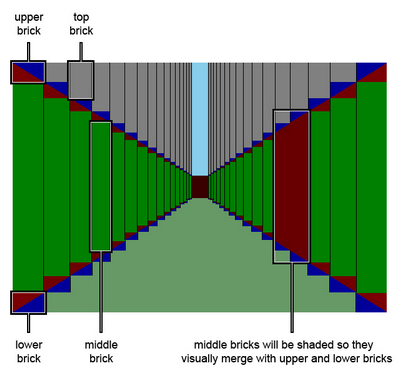
To draw a simple triangle, Edwards uses a bow-tie-shape and cuts it using clipping. He uses this figure to explain his approach:He needs two nested divs and a second lengthy CSS rule to cut out the triangle (I won't repeat the details here).
If he had taken a look at the Slant How-To, or stopped and thought about the approach for a second before writing a book about it, he would have noticed that it is much simpler. Just swap the transparency of the bottom border with the red color of the right border, and you are done. Or even better, collapse the right and bottom border of the bow tie to zero. Just one div and one simple CSS rule suffice in both cases.

Make it complicated, and there is more to explain
But it gets even worse. In the subsequent sections of the article, two triangles and a rectangle (which is, astonishingly, constructed from a single div) are combined to form "columns" of a slanting wall:
As you can see, each column of the wall comprises of four "bricks", where the two triangle bricks are composed of two divs, which results in a total of six divs. If I had implemented Jangaron's lightcycle walls like that, the frame rate would probably be two or three, making the game unplayable. Instead, a slanting wall in Jangaron is constructed from a single div like so:
Only the right border has a color, top and bottom border are transparent, the left border has zero width, and width is also set to zero. The full CSS rule is:
padding: 0;
margin: 0;
width: 0;
height: 5em;
border-style: solid;
border-color: transparent #E46C0A transparent transparent;
border-width: 7em 9em 7em 0;
Here is the resulting slant:
Note how using em (instead of px) resizes the slant when you change the browser's font size (usually ctrl-+ or ctrl-mouse-wheel)! Of course, this is not always desired, but serves as a quick demo that we are really producing vector graphics in HTML.
You could use margin-top to simulate Edward's "top brick" (I usually prefer absolute positioning). This means we have reduced six divs to one, with much less CSS hassle.

The TRBL with CSS or: Dad, 11 o'clock!
Finally, in another section of James Edwards' article, I wasn't sure whether I was probably taken for a fool:
These values are specified in the same order (top, right, bottom, left) as they are for other CSS properties, such as border, padding, and margin. Thinking of the word trouble (TRBL) should help you remember the correct order.
Whoa, those stupid CSS language designers defined these values in some random order so that you have to create a mnemonic to be able to remember it at all!
In trouble are also Indy and his father, when in "Indiana Jones and the Last Crusade", they have stolen a plane from the airship, and are now being chased by German fighters:
Indiana Jones: Dad, you're going to have to use the machine gun. Get it ready!
[Henry turns around and gets the gun ready]
Indiana Jones: [spotting an approaching fighter] 11 o'clock! Dad, 11 o'clock!
Professor Henry Jones: [looking at his watch] What happens at 11 o'clock?
What I want to say is that it is not exactly a new idea to specify directions clock-wise...