Showing posts with label border slants. Show all posts

Sunday, June 15, 2008

From a New Perspective

While some users prefer the first person view, even after adding look left/right/aback, you sometimes miss a bit of overview in the game.
Thus, I started working on a third-person perspective for Jangaron, where you can look over the lightcycle walls. To give you an early preview of how it may look like, I used Wink to produce a video of a game played with my workspace version. What you can see right at the beginning is the "camera" moving gently from the usual mid-horizon perspective to a bird's eye view above the player's lightcycle. I plan to provide keys for toggling between those two modes. As you can also see in the video, even in the third-person view, you can look in all four directions!
What do you think?


The technical challenge of this new perspective is that CSS border slants per se can only draw trapezoids where the projection of one of the parallel sides is completely contained within the other (leftmost figure). If the projection has at least a non-empty intersection, two slants (a "real" slant and a triangle) suffice (middle figure).
But what about arbitrary trapezoids? The solution is to cut the trapezoid in
a zigzag, resulting in serveral right angle triangles and one terminal slant (rightmost figure).
The worst case concerning the number of triangles is a very thin, 45 degree trapezoid. This is why I used another trick for the grid lines, which is to draw a white right angle triangle and a slightly smaller black one, so that only the white sloping line remains. I could not use that trick for the lightcycle walls, because they are drawn on top of the grid.
The question was if using this drawing technique degrades performance, but the answer seems to be "no". I use highly optimized code to update the DOM and to create the zigzag (just some linear equations; note that many coordinates can be reused!), so the overhead of projecting the wall etc. seems to outplay creating additional triangle/slant shapes. I hope to be done with the feature soon, so that you can check it out yourselves!

Friday, April 11, 2008

The Art and Science of CSS Border Slants

When reading through the games category over at Ajaxian, I stumbled across a review of James Edward's article The Art and Science of JavaScript Games. One the one hand, I was quite thrilled by the fact that somebody else had had the idea to write a 3D JavaScript / DHTML game, on the other hand, I was quite disappointed by the realization (given its pretentious title).
James Edwards may belong to the "seven of the greatest minds in modern JavaScript" (as quoted on his own home page), but he misses some points about CSS border slants, which leads to an unnecessary complex solution.
Unfortunately, the source he cites, Tantek Çelik's "technique for creating shapes using the interactions between CSS borders", leads to a dead link. I could only find something similar, A Study of Regular Polygons. I still prefer the source already mentioned in a previous post, CSS border slants, which links to the original source of Eric Meyer's Slantastic Demo.

Triangle Man Hates Particle Man
Whatever source James Edwards used, he should have realized that the shapes he wants to draw for his 3D maze can be produced much simpler. And thus he misses the most important point for a tutorial: keeping things simple!
To draw a simple triangle, Edwards uses a bow-tie-shape and cuts it using clipping. He uses this figure to explain his approach:He needs two nested divs and a second lengthy CSS rule to cut out the triangle (I won't repeat the details here).
If he had taken a look at the Slant How-To, or stopped and thought about the approach for a second before writing a book about it, he would have noticed that it is much simpler. Just swap the transparency of the bottom border with the red color of the right border, and you are done. Or even better, collapse the right and bottom border of the bow tie to zero. Just one div and one simple CSS rule suffice in both cases.

Make it complicated, and there is more to explain
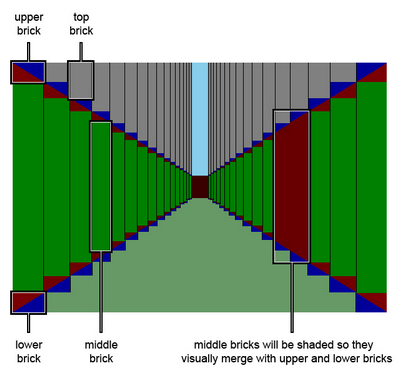
But it gets even worse. In the subsequent sections of the article, two triangles and a rectangle (which is, astonishingly, constructed from a single div) are combined to form "columns" of a slanting wall:
As you can see, each column of the wall comprises of four "bricks", where the two triangle bricks are composed of two divs, which results in a total of six divs. If I had implemented Jangaron's lightcycle walls like that, the frame rate would probably be two or three, making the game unplayable. Instead, a slanting wall in Jangaron is constructed from a single div like so:
Only the right border has a color, top and bottom border are transparent, the left border has zero width, and width is also set to zero. The full CSS rule is:
padding: 0;
margin: 0;
width: 0;
height: 5em;
border-style: solid;
border-color: transparent #E46C0A transparent transparent;
border-width: 7em 9em 7em 0;
Here is the resulting slant:
Note how using em (instead of px) resizes the slant when you change the browser's font size (usually ctrl-+ or ctrl-mouse-wheel)! Of course, this is not always desired, but serves as a quick demo that we are really producing vector graphics in HTML.
You could use margin-top to simulate Edward's "top brick" (I usually prefer absolute positioning). This means we have reduced six divs to one, with much less CSS hassle.

The TRBL with CSS or: Dad, 11 o'clock!
Finally, in another section of James Edwards' article, I wasn't sure whether I was probably taken for a fool:
These values are specified in the same order (top, right, bottom, left) as they are for other CSS properties, such as border, padding, and margin. Thinking of the word trouble (TRBL) should help you remember the correct order.
Whoa, those stupid CSS language designers defined these values in some random order so that you have to create a mnemonic to be able to remember it at all!
In trouble are also Indy and his father, when in "Indiana Jones and the Last Crusade", they have stolen a plane from the airship, and are now being chased by German fighters:
Indiana Jones: Dad, you're going to have to use the machine gun. Get it ready!
[Henry turns around and gets the gun ready]
Indiana Jones: [spotting an approaching fighter] 11 o'clock! Dad, 11 o'clock!
Professor Henry Jones: [looking at his watch] What happens at 11 o'clock?
What I want to say is that it is not exactly a new idea to specify directions clock-wise...

Sunday, March 30, 2008

From C-64 Till Dawn

I just joined the Tron Sector forum to create some promotion for Jangaron and was about writing a really long post, but then I thought, "hey, why did you just start a Jangaron blog? Spare Tron Sector a couple of bytes to host and blog it!" So I just posted a short introductory text and links to the game and this blog.
When browsing through their light cycle games list, I found several justifications for creating yet another one of these. My justification is that I wanted to start a game software project that feels like back in the 80s: Try to do something amazing with very limited technologies. So I got into my head to implement a 3D light cycle race not only as a browser game, but also (mainly to make it harder) without using any plug-in or proprietary browser features like filters or canvas. It had to be a challenge close to impossible.
Moreover, writing a light cycle game is something I failed to finish back when the Tron movie was new (I was young but didn't need the money). I started to implement the game, but my computer graphics skills were as inadequate as the C-64's, so it got buried in oblivion.
Well, in the meantime, things changed: I have a Ph.D. in computer science now, which makes me a perfect candidate to re-implement a 25 year old game idea in JavaScript.
I have been using and getting to love JavaScript at work for years. It features a unique combination of functional and object oriented programming that leaves the impression of an independent congeniality. To overcome some limitations of the language design and to make things more interesting, already in 2003, on of my colleagues (and co-founder of the company!) anticipated ECMAScript 4 by creating a compiler from a subset of the specification (as it was then) to JavaScript 1.x as it can be executed in browsers. I continued his work and built a second version that moved a bit more complexity to a run-time library for the sake of even better readable and debuggable compiler output. This left me in a situation where I had all the tools to create awesome JavaScript frameworks and applications, so I needed some excuse to use them even in my spare time.
Until half a year ago, I was totally convinced that it is impossible to do any ambitious graphics with (D)HTML. But I am a UI guy, meaning that software without a face is a no-go for me, so I didn't give up. In one of my never-ending CSS-DHTML-JavaScript-google-sessions, I stumbled across CSS border slants (at the latest then I started to be proud of my danish ancestors!), which opened up unbelievable possibilities and kept me from sleeping quite some time. I don't want to deprive you of one quote from the border slants page:
For a dynamic example, see the Rotating Star demo. Also proves that DHTML and JavaScript are not fast enough to do wire-frame games.
Ha!, I thought, I will prove you wrong! Despite the fact that Jangaron is not exactly a wire-frame game, but uses a lot of filled trapezia, I guess what you can see by now does prove them wrong. The trick is that I chose a game that quite coincidently has such a limited perspective and so simple game objects that the restrictions of border slants do not apply.
Furthermore, there are many things you have to bear in mind to end up with efficient DHTML (and which the creator of the Rotating Star demo probably was not aware of). One anecdote is that while I learned a lot from some Opera "efficient JavaScript" page, my game ran unbearably slow only in Opera, until very recently -- I still don't know which code change caused the sudden performance change. In many cases, trial and error is your friend. After all, I was surprised that at least on my hardware, the frame rates do not really vary tremendously between different browsers. One browser can treat transparency more efficiently, another delivers smoother animations (less jerking -- better garbage collection?), but the overall frame rate is almost equal. Even most-hated Internet Explorer is not bad when it comes to JavaScript and DHTML execution speed. And believe me, I did not implement browser-specific performance optimizations (the browser-specific workarounds for bugs to get it to run at all were sufficiently complicated).
What is said to be true for a Web-site seems to be true for a cross-browser game, too: If you do the right thing, it will be best played with any browser!
I hope we can use this blog to discuss more about what the right thing is in JavaScript browser game programming, but now, the daylight-savings-time-bastards have already stolen another hour of my life, Dawn has almost cracked and I have to sleep.
Good night.